USB Port and Controller Mapping
This page is about one specific operational fact:
- not all USB ports on the collection machine are equivalent
For multiple high-bandwidth cameras, the important question is not just "is there a free blue port?" The important question is:
- which USB controller will this device land on?
If two heavy camera streams share the same controller, you can create avoidable bandwidth and stability problems.
Preferred Tool
Use the local helper:
The helper prints:
- the current root-bus to controller map
- the currently attached non-root USB devices
- add/remove events while you plug and unplug devices
Use it one device at a time:
- start the watcher
- plug one device into one physical port
- note the reported root bus and PCI controller
- unplug it if you are still mapping the machine
- repeat until you know which physical ports share controllers
Current Zeus Controller Map
On the current collection machine, the relevant USB 3 root buses are:
usb2-> controller0000:07:00.3usb4-> controller0000:53:00.3usb6-> controller0000:ea:00.1usb8-> controller0000:ea:00.3
The screenshots below capture the current machine-specific port layout that was mapped with the watcher.
Rear panel
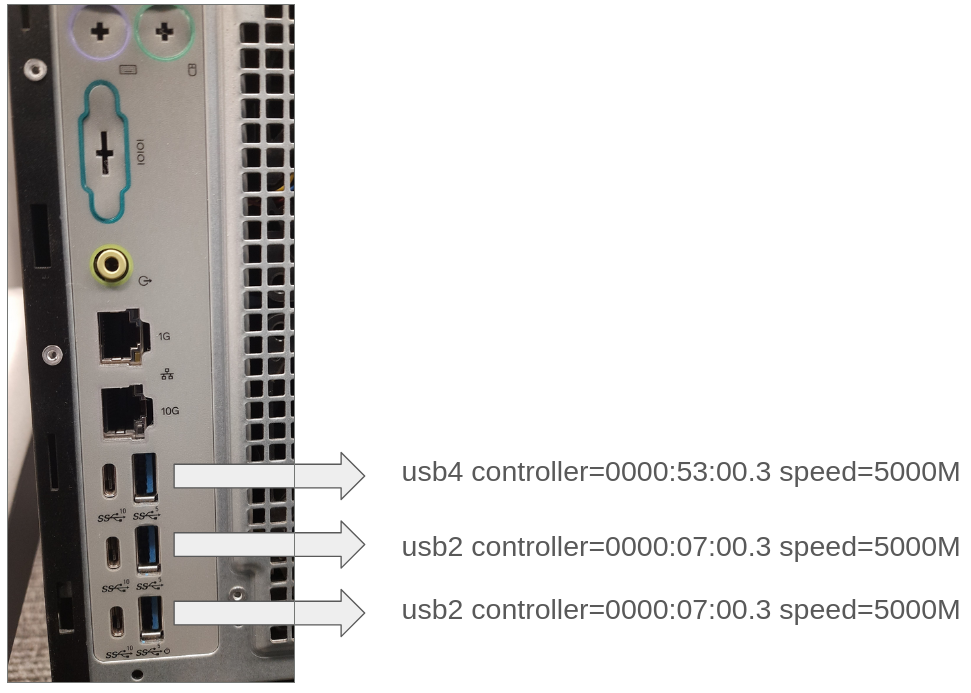
What this shows:
- the top rear blue USB-A port lands on
usb4, controller0000:53:00.3 - the lower two rear blue USB-A ports land on
usb2, controller0000:07:00.3
Operational takeaway:
- the lower two rear blue ports are not independent from each other
- if you need two cameras on different controllers, do not put both of them in those two lower rear blue ports
Front panel
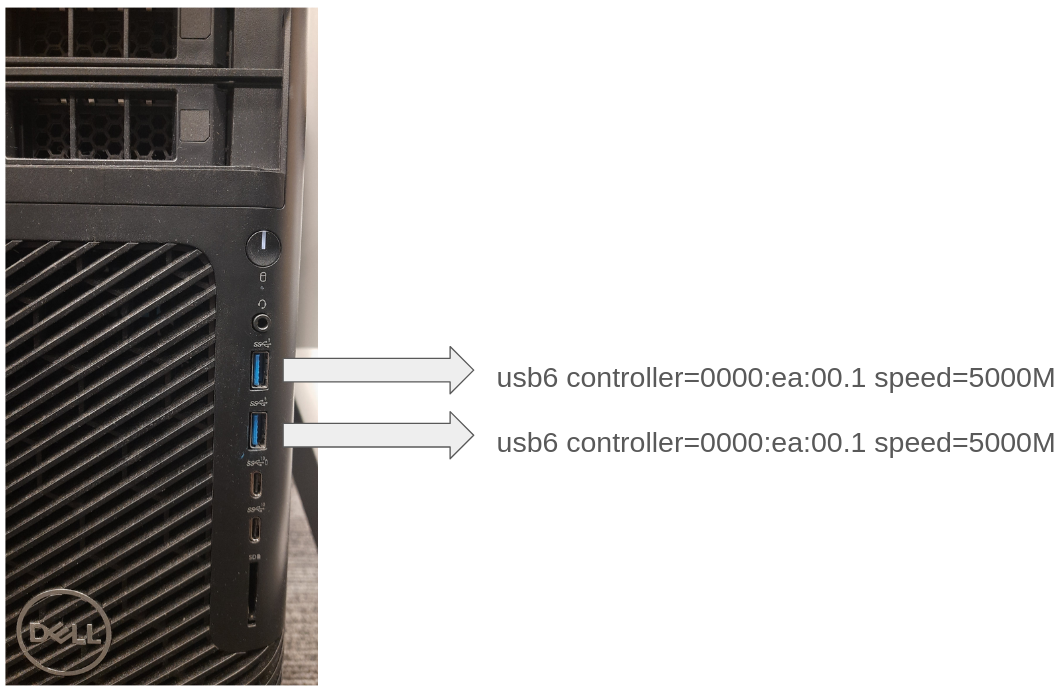
What this shows:
- both front blue USB-A ports land on
usb6, controller0000:ea:00.1
Operational takeaway:
- the front blue ports also share one controller
- do not assume that "front left" and "front right" give you controller separation
Practical Rule For Multi-Camera Sessions
When using multiple RealSense cameras:
- spread them across different controllers when possible
- verify the controller assignment with the watcher instead of guessing from port location
- remap the machine again if the rig, hub layout, or motherboard ports change
The watcher is a mapping and verification tool. It is not a one-time setup artifact.
Related Setup Page
The operator-facing bring-up flow references this page here: